Finding creative ways to keep children entertained while supporting their learning can be challenging for parents, teachers, and educational entrepreneurs.
Traditional board games are enjoyable, but designing personalized educational games often requires significant time, artistic skills, and expensive software.
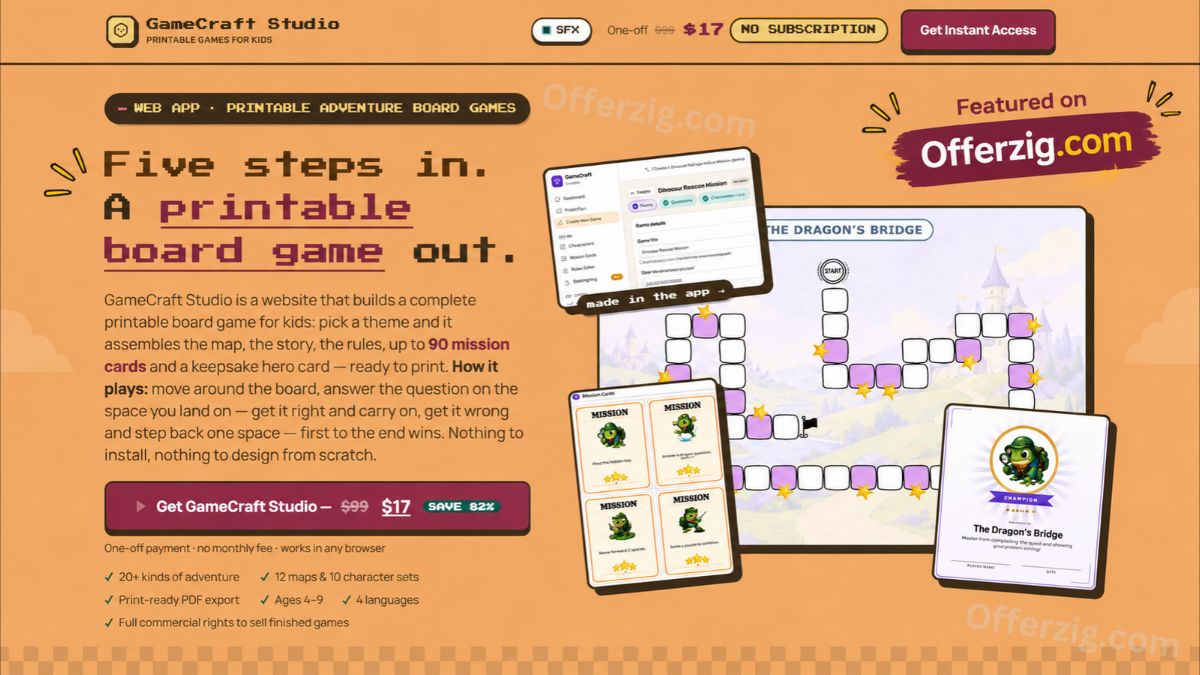
GameCraft Studio offers an alternative by helping users create printable adventure board games for children without starting from scratch.
This browser-based printable board game maker combines themed adventure maps, educational questions, character designs, and ready-to-print materials into one convenient platform.
Whether you are a parent looking for screen-free entertainment, a teacher developing engaging classroom activities, or an entrepreneur exploring printable digital products, this tool offers a practical approach to game creation.
In this detailed guide, we explore its features, educational applications, pricing, benefits, limitations, and commercial opportunities to help you decide whether it meets your needs.
What Is GameCraft Studio?
GameCraft Studio is an online board game creation tool designed to produce printable adventure games for children, primarily ages 4–9.
Unlike traditional graphic design platforms, it uses a structured game-building system. Users choose a theme, select characters, customize educational activities, and prepare a printable game.
The platform includes ready-made templates, allowing beginners to build activities without professional design experience.
According to its official sales page, the platform provides 12 adventure themes, 20 or more adventure concepts, 10 character sets, and printable PDF output.
The resulting games can be used for family activities, classrooms, tutoring sessions, holiday programs, and other supervised learning environments.
Claim Your Discount Today
Why Printable Board Games Are Valuable for Kids’ Educational Games
Educational activities do not always require smartphones, tablets, or computers.
Physical games encourage children to interact with others, follow instructions, solve problems, and participate in shared experiences.
Research supports the broader value of playful learning.
A clinical report published by the American Academy of Pediatrics in 2018 and reaffirmed in January 2025 explains that developmentally appropriate play supports cognitive, language, social-emotional, and self-regulation skills.
Although this research does not evaluate GameCraft Studio specifically, it helps explain why well-designed educational games can be valuable.
Encouraging Problem-Solving Skills
Adventure board games can encourage children to consider different possibilities before making decisions.
For example, a child might need to solve a simple addition problem before advancing along a game board.
This creates opportunities to practice reasoning in a playful setting.
Supporting Social Interaction
Multiplayer games encourage children to take turns, listen to instructions, communicate with others, and follow agreed rules.
These experiences can complement classroom instruction and family learning activities.
Making Learning More Enjoyable
Traditional worksheets sometimes feel repetitive.
Educational games introduce stories, characters, and goals that make familiar learning tasks more engaging.
A dinosaur adventure, for instance, can combine number recognition with a rescue mission.
The educational value ultimately depends on the quality of the activities and how adults guide the experience.
Key Features of GameCraft Studio Printable Board Game Maker
The platform combines several tools into a single game-creation process.
Understanding its main features can help determine whether it suits your educational or commercial goals.
1. Twelve Adventure Themes
The software includes twelve themes, covering settings such as forests, dinosaurs, space, oceans, pirates, castles, robots, and farms.
These different environments allow users to create games around children’s interests.
A space-themed game might encourage science questions, while a forest adventure could introduce nature-related activities.
Themes also make it possible to produce different games without redesigning every visual element.
2. Ready-Made Adventure Templates
The platform includes more than twenty adventure concepts.
Users can begin with an existing storyline or create a custom game name.
This feature may be particularly valuable for teachers who regularly prepare educational materials.
Rather than planning every adventure from the beginning, they can adapt established game structures to different topics.
3. Educational Mission Cards
One of the most useful features is the mission-card system.
The platform supports educational subjects including mathematics, reading, vocabulary, science, nature, logic, life skills, and geography.
Depending on the selected difficulty level, a completed game can include 60 or 90 mission cards.
The developer describes a template-based system designed to avoid duplicate questions within the same game.
Teachers and parents should still review the generated questions for accuracy, age suitability, and relevance.
4. Printable PDF Export
The system prepares game materials for printing on standard A4 paper.
A completed package can include an adventure map, storyline, instructions, mission cards, character tokens, a foldable paper die, an answer key, and a winner card.
Users can save the output as a PDF through their browser.
This eliminates the need to arrange every element manually using separate graphic design applications.
5. Custom Characters and Artwork
The included character library helps users maintain a consistent visual style.
Characters can appear across mission cards, player tokens, and collectible winner cards.
Users can also upload suitable custom artwork when they want more personalized designs.
This option may appeal to educational content creators who want games aligned with a specific classroom theme or creative project.
Related Article: SuccessWithMark Solo Ads Review: Is It Worth Your Money?
How GameCraft Studio Board Game Creator Works
Creating a game follows a five-step workflow.
The platform is a template-based assembler rather than a conversational AI game generator.
Step 1: Choose the Game Basics
Start by entering a game name, choosing an adventure theme, and selecting the difficulty level.
These decisions influence the game board, number of cards, and intended age range.
Step 2: Select Visual Elements
Choose a map design, character set, and mission-card style.
Existing templates provide a consistent appearance, while optional artwork uploads enable additional customization.
Step 3: Customize the Adventure Background
Use the provided background graphics or prepare your own artwork.
The platform also offers image-prompt guidance for users who want to produce external illustrations.
Step 4: Select Learning Activities
Choose the subjects that children will practice during gameplay.
For example, a teacher could combine mathematics and logical reasoning for a classroom revision activity.
Users may also enter their own questions.
Step 5: Preview and Export
Review the finished board, mission cards, and supporting materials before printing.
Any unsuitable activities should be corrected before the game is distributed.
The browser’s print function allows the completed material to be saved as a PDF.
GameCraft Studio Review: Beginner vs Standard Game Levels
The standard purchase provides two difficulty levels.
| Feature | Beginner | Standard |
|---|---|---|
| Recommended age | 4–6 years | 6–9 years |
| Board spaces | 12 | 18 |
| Mission cards | 60 | 90 |
| Players | 2–6 | 2–6 |
| Estimated playtime | 15–20 minutes | 25–35 minutes |
These are the developer’s recommended game configurations, not independently measured learning outcomes.
An Advanced level for older children is displayed on the sales page but requires a separate purchase.
“Get Instant Access Now”
Real-World Examples of Printable Adventure Games
To understand how the software might be used, consider three practical scenarios.
These are illustrative examples, not verified customer case studies.
Example 1: A Dinosaur Mathematics Adventure
Imagine a primary school teacher preparing a mathematics revision activity for six-year-old students.
The teacher selects a dinosaur theme and adds simple addition and subtraction questions.
Students move through the adventure map, answering questions to progress.
This approach combines arithmetic practice with a playful group activity.
Example 2: A Family Ocean Rescue Game
A parent wants an indoor activity for a rainy afternoon.
They choose an ocean adventure featuring a rescue storyline, colorful characters, and age-appropriate challenges.
After printing and assembling the materials, family members can participate together without using a screen during gameplay.
The activity provides opportunities for conversation, cooperation, and shared decision-making.
Example 3: A Printable Product for an Online Store
An educational entrepreneur wants to develop themed printable learning games.
They create a selection of adventure games, customize the materials, review the content, and prepare attractive product previews.
The finished products could potentially be sold through an appropriate digital marketplace, subject to the platform’s commercial license and marketplace rules.
The existence of commercial rights does not guarantee sales or customer demand.
Can You Sell Games Created With GameCraft Studio?
An interesting feature for entrepreneurs is the commercial-use permission advertised by the developer.
According to the official product page, customers may sell completed games they assemble using the platform.
However, the underlying artwork library cannot be resold independently as artwork or redistributed as a separate asset collection.
Potential uses include selling finished printable games through online marketplaces, educational resource stores, or direct-to-customer websites.
Before listing a product, creators should check the full licensing terms and ensure their content meets the rules of the chosen marketplace.
They should also consider customer demand, product quality, pricing, taxes, and marketing expenses.
A well-designed game is a starting point, not an automatic source of revenue.
Who Should Consider This Printable Board Game Maker?
The software may appeal to several groups.
Parents: Families looking for affordable, reusable, screen-free activities can prepare games based on their children’s interests.
Teachers: Educators can customize question topics, organize group activities, and create themed revision exercises.
Homeschooling families: Parents who manage home-based learning may use printable games to supplement lessons.
Tutors: Learning centers and tutors can adapt activities for different subjects and age levels.
Digital entrepreneurs: Creators interested in educational printables may explore finished-game products for commercial use.
However, the platform may be less suitable for anyone seeking complex digital games, fully AI-generated designs, or professional game-development software.
It also depends on access to a printer or printing service.
Related Article: 25 Best Online Jobs for Students to Earn Money from Home
GameCraft Studio Pricing and Value
The official sales page advertises a promotional one-time price of $17, compared with a displayed regular price of $99.
The developer states that the purchase does not require a monthly subscription or impose a per-game charge.
The advertised package includes the printable game builder, themes, character sets, two standard difficulty levels, and browser-based export tools.
A seven-day money-back guarantee is also advertised.
Because promotional prices can change, customers should verify the final amount and refund conditions at checkout.
The value depends on how frequently the product will be used.
For someone preparing multiple classroom activities or printable products, reusable templates may be more practical than designing every game manually.
However, printing costs, paper, ink, and preparation time should also be considered.
Advantages and Limitations of GameCraft Studio
A balanced product review should explain both the benefits and potential drawbacks.
Main Advantages
-
Beginner-friendly, browser-based workflow
-
Multiple adventure themes and character options
-
Educational mission-card generation
-
Printable game components and answer keys
-
Custom artwork and question options
-
Commercial rights for finished games
-
Advertised one-time pricing
Potential Limitations
The software relies on a fixed library rather than unlimited AI-generated design possibilities.
Users wanting completely original board layouts may need additional design tools.
The included package primarily targets children aged four to nine.
Educational content requires adult review, especially when used for formal teaching.
Commercial success is uncertain, and sellers must research their own markets.
Finally, this review is based on published product information rather than an independent hands-on software test.
Is GameCraft Studio Worth It in 2026?
For parents and teachers who regularly create educational activities, GameCraft Studio presents an interesting alternative to manually designing printable games.
Its strongest appeal is convenience.
Instead of managing artwork, layouts, question cards, and instructions across separate applications, users can assemble these elements through one structured workflow.
The opportunity to customize subject areas also makes the product more flexible than a single pre-designed printable board game.
For digital entrepreneurs, commercial licensing offers an additional possible use, although business outcomes depend on product quality and customer demand.
The most sensible approach is to evaluate the actual sample output, supported features, license restrictions, and refund conditions before purchasing.
Final Thoughts
GameCraft Studio brings together adventure storytelling, educational activities, and printable board game creation in a beginner-friendly format.
Its combination of themed maps, customizable mission cards, character designs, and PDF exports may help parents, teachers, and educational creators spend less time preparing game materials.
The product is particularly interesting for people who value screen-free play and want an adaptable way to create learning activities.
It is not a substitute for thoughtful teaching or a guaranteed digital business opportunity. Nevertheless, its structured design tools can offer a practical starting point for creating engaging printable games.
To explore the available examples, features, and current purchase conditions, visit the
“Get Instant Access Now”
Frequently Asked Questions (FAQs)
1. What is GameCraft Studio used for?
GameCraft Studio is a browser-based tool for creating printable educational adventure board games. It combines themed maps, storylines, questions, characters, and printable components.
2. Is GameCraft Studio suitable for beginners?
Yes. Its structured workflow is designed for users without professional graphic design or programming experience. Users still need to review and assemble their printed materials.
3. Can teachers create educational games with GameCraft Studio?
Yes. Teachers can select subjects such as mathematics, reading, vocabulary, science, and logic to prepare themed learning activities for children.
4. Can I sell printable games made with GameCraft Studio?
The developer advertises commercial rights for completed, assembled games. However, users cannot separately resell the included artwork library. Review the license terms before selling.
5. Does GameCraft Studio require a monthly subscription?
According to the official sales page, it is offered as a one-time purchase without monthly subscription fees. Customers should verify the current pricing and conditions before checkout.
Related Article: 510 Crazy Animal Coloring Prompts Review: AI Coloring Book Creator Guide